Day-to-Night Photo Conversion: How Day-to-Dusk Editing Works
For a real-estate listing, the useful target is believable twilight, not a generic dark-blue night filter.
The short version
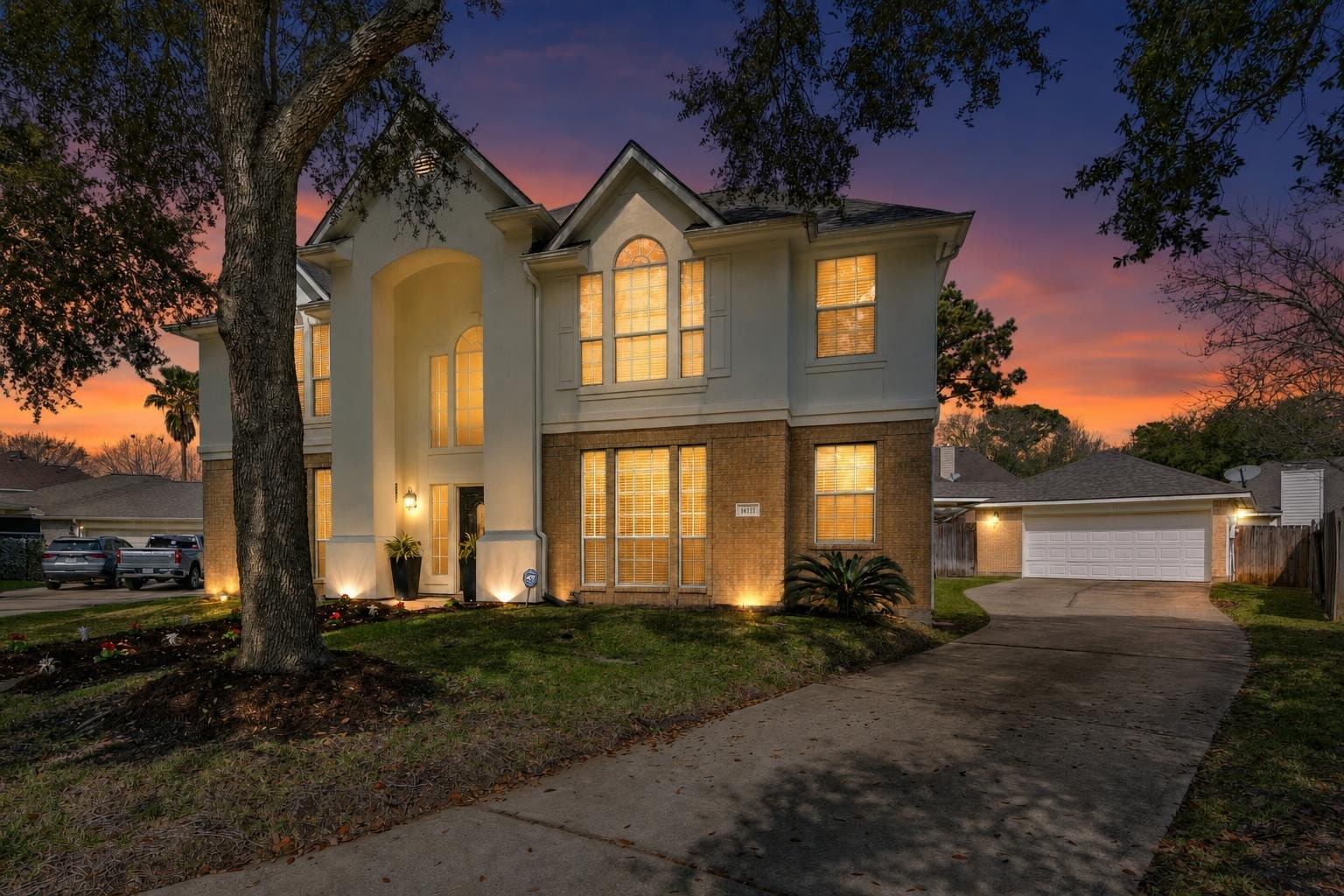
The twilight exterior is the shot buyers click most, and you no longer have to wait until 8pm for it. A day-to-dusk conversion takes a clean daytime facade and relights it for the blue hour, warming the windows and replacing the sky. Like any edit that changes the property's appearance, it needs disclosing.
Scroll any listing gallery and the photo that stops you is almost always the twilight exterior — the house glowing from within, the sky a deep gradient of blue and amber. Real estate photographers charge a premium for it because it means coming back at dusk and shooting a narrow 20-minute window. Day-to-dusk conversion skips all of that: you shoot the exterior in ordinary daylight, and AI turns it into the twilight version — darkened sky, warm interior lights, the whole mood — in about 30 seconds. Here's how it works and how to keep it believable.
Day-to-night versus day-to-dusk
A generic day-to-night photo effect usually darkens the whole frame, cools the color, and aims for moonlight. Real-estate day-to-dusk editing has a narrower job: create the brief blue-hour balance where the sky still has color, the facade still has detail, and believable window or exterior light can glow without turning the property into a night scene.
That distinction matters because buyers still need to read the actual home. The edit should not invent a new roofline, landscaping, windows, neighboring context, or camera angle. If you are looking to run the edit rather than learn the technique, use the day-to-dusk real-estate photo editor.
Why the dusk shot works so hard
The twilight exterior isn't just prettier — it does specific jobs a daytime shot can't:
- It's the scroll-stopper. In a grid of daytime thumbnails, a glowing house is the one the eye lands on. More clicks into the listing start there.
- It sells warmth. Lit windows read as "home" — cozy, lived-in, inviting — in a way a flat midday facade doesn't.
- It hides harsh light. Midday sun blows out rooflines and throws hard shadows. Dusk's soft, even light flatters the architecture.
- It signals a premium listing. Buyers associate twilight photography with higher-end listings, so the whole gallery reads as more considered.
How AI day-to-dusk conversion works
You give the tool a clean daytime exterior. It identifies the sky and replaces it with a dusk gradient, darkens the overall exposure to match, adds a warm glow to the windows so the house reads as lit from inside, and balances the ambient light so the yard, driveway, and landscaping settle into evening tones. The good tools keep the building itself untouched — same rooflines, same windows, same trees — and only change the light and sky. A daytime photo becomes the 8pm hero shot without anyone standing in the cold waiting for the sun to drop.
Start with the right daytime shot.
Dusk conversion is only as good as its input. Shoot the exterior on an overcast day or in the softer light of early morning or late afternoon — not harsh noon. A clean sky, no lens flare, and the whole facade in frame give the AI the room it needs to relight convincingly.
How to get a believable dusk photo
- Shoot the facade straight and complete. Get the full house in frame with level verticals. Cropped or tilted exteriors are harder to relight cleanly.
- Avoid harsh midday sun. Overcast or golden-hour input converts far more naturally than a high-contrast noon shot.
- Turn on the exterior lights if you can. Real porch and path lights give the AI anchors to enhance, though it can add the interior glow on its own.
- Don't overdo the drama. A believable dusk is subtle — a deep blue sky, not a neon sunset. Restraint is what separates a premium shot from an obvious edit. The same principle that keeps AI staging from looking fake applies here.
- Use it on the hero, not everything. One or two twilight exteriors lead the gallery. You don't need every outdoor shot at dusk.
Disclose it like any edit
A day-to-dusk conversion changes the appearance of the property, so treat it the way you'd treat virtual staging: check your MLS rules and label it if required. Most buyers understand a twilight photo is a stylized hero shot, but a quick disclosure keeps you clean. See the disclosure rules for where the lines are.
Do it yourself in about 30 seconds
Stylst has a dusk mode built in: upload a daytime exterior, choose dusk, and get the twilight version back in about 30 seconds for roughly a dollar — no second trip, no waiting for the light. It keeps the house exactly as shot and changes only the sky and glow. Compare it to shooting real twilight in DIY twilight photography, or just try it on your next exterior.
Questions people actually ask
What is a day-to-dusk photo conversion?
It takes a clean daytime exterior and relights it as a twilight scene: the sky becomes the deep blue of the moments after sunset, the interior lights read as warm and glowing, and the whole facade picks up the contrast that makes a dusk shot stop the scroll. It happens in about 30 seconds.
How do I get a believable dusk conversion?
Give it a clean, straight, complete daytime shot of the facade in decent light. The conversion inherits everything in the original, so a crooked frame or a car in the driveway stays crooked and stays in the driveway. Avoid harsh midday shadows if you can, because they do not belong in a twilight scene.
Do I need to disclose a day-to-dusk photo?
Treat it the way you treat virtual staging. It changes the appearance of the property, so check your MLS rules and label it where they require it. Many MLSs treat sky replacement and relighting differently from adding furniture, so the honest move is to read your local policy rather than assume.