Captions for Listing and Reveal Posts
"Just listed! 🏡✨" is not a caption. Three angles that work, written out, plus what to do with hashtags.
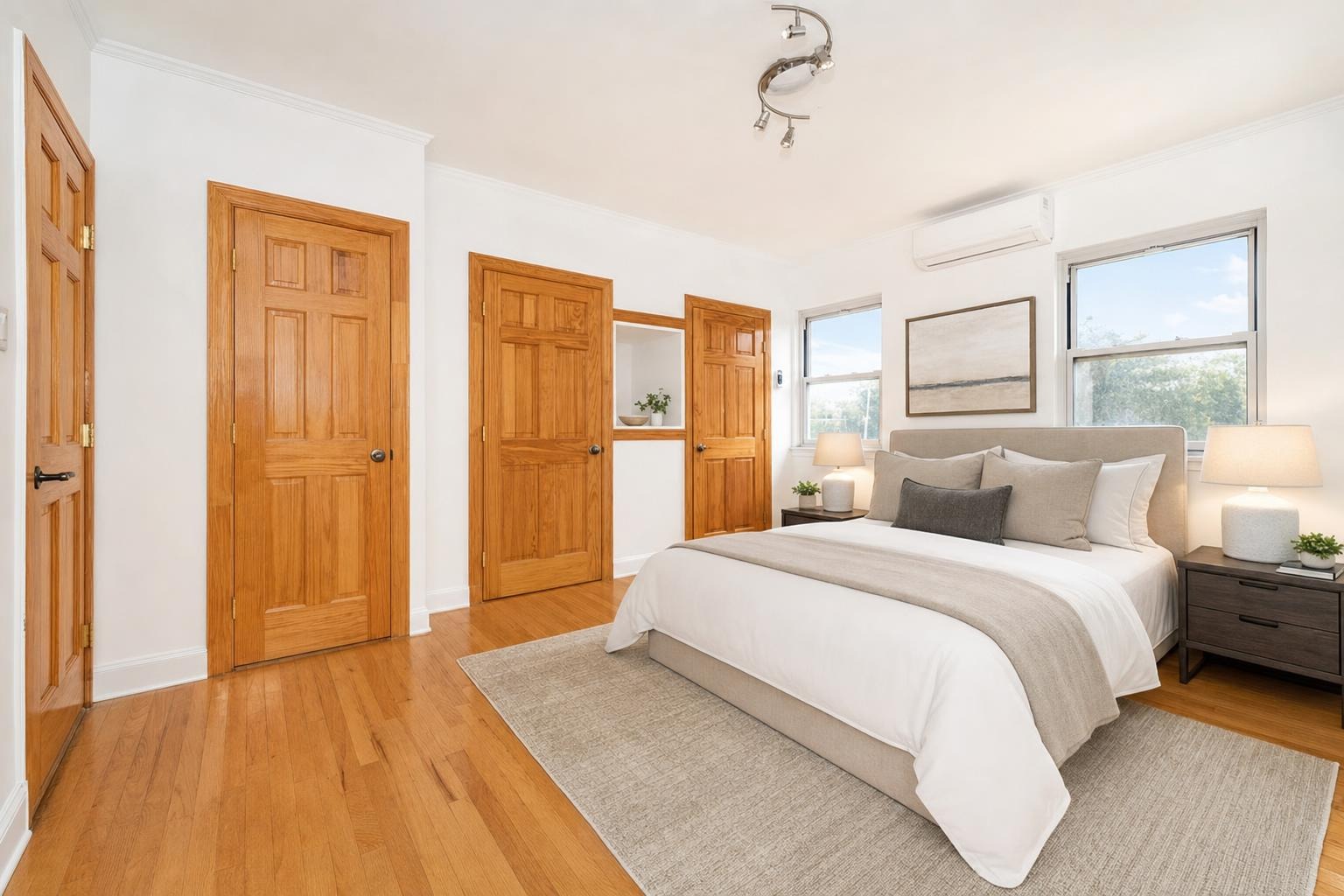
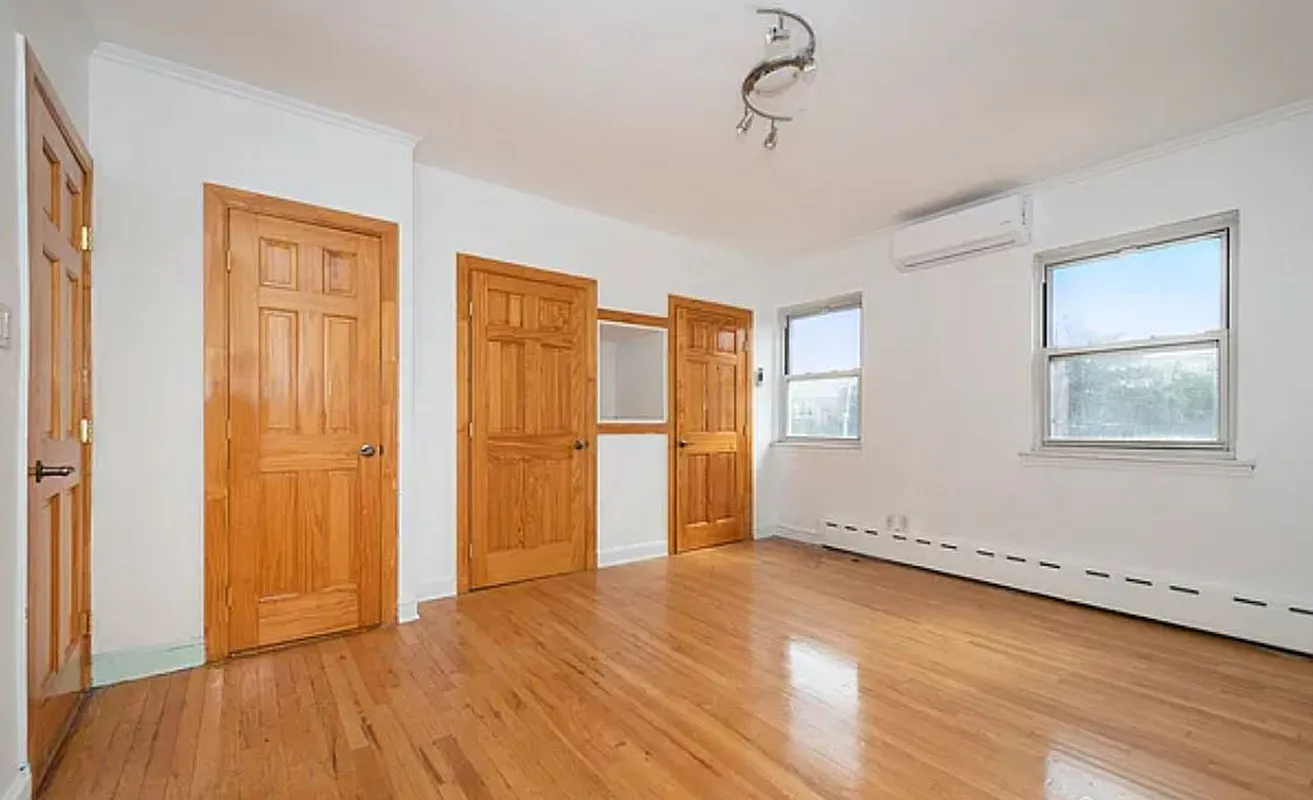 after · staged
before
after · staged
before
The short version
Just listed with a house emoji is not a caption. There are three angles worth writing: the transformation, the property, and the insight. Put the hook in the first line because everything after it is truncated, use fewer and more specific hashtags than you are using, and match the caption to what you actually did to the photo.
Most real estate captions are written like a press release for a house nobody asked about. Address, bed count, bath count, square footage, three emoji, "DM me for details!" That caption does one job — it tells people who already follow you that you have a listing. It does nothing for the far larger group of people the algorithm is deciding whether to show you to.
A caption's actual job is to give someone a reason to stay on the post an extra beat and, ideally, to say something. Comments and saves are what get a post pushed further. So write for the person who does not care about your listing yet.
The three angles
For any before/after or listing post, there are only three caption angles worth writing. Pick one — never all three in the same caption.
1. The transformation
Lead with the change. This is the default for a reveal post because it's what the image is already promising.
This bedroom sat empty for three weeks of showings and every single buyer said the same thing: "it feels small." It's 12 by 14. It was never small — there was just nothing in it to give your eye a sense of scale. Here it is with a bed in it. Same room, same corner, same window.
Virtually staged. The furniture isn't included, the square footage is.
2. The work
Lead with what you did and why. This one builds authority — it's the caption that makes another agent's client wonder why their agent doesn't do this.
The seller's photos weren't bad. They were just taken at 4pm with the blinds half open and every lamp off, which is how a $525K house ends up looking like a rental listing.
Reshot it in the morning, opened everything, and put furniture in the two rooms that were empty. Went live Friday. Eleven showings booked by Sunday.
The house didn't change. The photos did.
3. The detail
Zoom in on one specific thing. Counterintuitively, the smallest caption often gets the most engagement, because specificity is what people reply to.
Original 1961 built-ins. Nobody painted them white. Nobody ripped them out. Somebody just dusted them for sixty-four years and then sold the house.
I don't know who you were, but thank you.
The app writes all three for you.
Stylst's post composer reads your finished photo and generates three captions — the transformation, the work, and the detail — plus a hashtag set, tuned to whether you're an agent, a host, or a contractor. Shuffle for a different take, tap the one you want, and it's on your clipboard ready to paste. It's free and doesn't cost a credit. It's still your post — edit it, add the address, cut the line you'd never say out loud.
Rules that hold across all three
- First line is the hook. Instagram truncates after roughly two lines. If your first sentence is "Just listed in Maple Grove!" you've spent the only part most people read.
- Write like a person talking. Contractions, short sentences, one idea per line. Read it out loud — if you'd never say it, delete it.
- One call to action, at the end. "Comment SHOW and I'll send the address" beats "Link in bio for more information about this stunning property."
- Ask something answerable. "Would you keep the built-ins or paint them?" gets replies. "Thoughts?" doesn't.
- Cut the adjective stack. "Stunning, luxurious, immaculate, must-see" is four words that mean nothing. One concrete detail beats all of them.
- Disclose the staging in the caption. One line, near the end, plainly: "Virtually staged." Nobody has ever unfollowed over that. See disclosing virtual staging on social media.
Hashtags: fewer than you think, more specific than you're using
Hashtags are a discovery mechanism, not decoration. Five to ten, mixed:
- Geographic and specific. #hudsonvalleyrealestate, #astoriaqueens. This is where your actual buyers are.
- Category. #virtualstaging, #beforeandafter, #homestaging. These have real, interested audiences.
- Design. #midcenturymodern, #coastalinteriors — matched to the style you actually staged in. This is how a design-curious non-buyer finds you.
Skip #realestate and #home. You are competing with everything on earth for a tag no human browses. And keep them out of the body of the caption — they belong at the bottom, or in a first comment.
Match the caption to the tool you used
The honest version of your caption depends on what you actually did to the photo, and the difference matters more than most agents think:
- Stage. Furniture was added. Say "virtually staged."
- Enhance. A real room, brightened and corrected. Nothing added, nothing removed. No disclaimer needed — it's a photo edit, the same category as basic listing photo editing.
- Declutter. Clutter removed, real furniture kept. Honest, and worth saying out loud in the caption — "same furniture, just the laundry pile gone" is a funny, human line.
- Day-to-Dusk. The sky changed, the house didn't. Most agents note it; it also happens to make a great caption hook.
- Renovation Preview. This one must be labeled — it shows a kitchen that does not exist. "Renovation concept, not the current condition." See AI renovation preview.
Captions for hosts and contractors
Same three angles, different stakes. A short-term rental host's caption is a booking pitch, and it has to describe a real space accurately — Airbnb and VRBO penalize listings whose photos don't match what the guest walks into. See Airbnb listing photos and the hosts page. A contractor's caption is a portfolio entry: what was wrong, what you did, how long it took. That's covered in renovation photos for contractors.
Where Stylst lands
Stylst stages, enhances, declutters, or dusks a phone photo for about a dollar, in about 30 seconds, no account or subscription on mobile. When the photo is done, "Make it a post" gives you the reveal reel, the right export size, and three captions written against your actual photo — free. Stage a photo and see what it writes.
The bottom line
The photo earns the stop. The caption earns the comment. Pick one angle — the transformation, the work, or the detail — put your best line first, disclose what you changed, and ask one real question. That is the entire craft, and it takes ninety seconds once you stop trying to sound like a brochure.
Questions people actually ask
What should a listing post caption say?
Pick one of three angles and commit to it. The transformation angle tells the story of what changed. The property angle sells the specific home to a specific buyer. The insight angle teaches something and earns you the follow. Trying to do all three in one caption produces a caption that does none.
How many hashtags should a real estate post use?
Fewer and more specific than most agents use. Hashtags are a discovery mechanism, not decoration, and thirty broad tags signal spam while a handful of specific ones reach people actually searching. Local and niche tags outperform generic ones, because that is where a realistic audience for one listing exists.
Does the caption need to mention that a photo was edited?
It depends what you did, and the difference matters more than most agents think. Brightening and colour correction are just photography. Adding furniture that is not in the house needs saying plainly, in the caption and on the image, because a follower cannot tell and may be a buyer.