Virtual Staging for Occupied Homes: What You Can and Can't Remove
The seller still lives there. Their sectional is enormous, there's a cat tree in the corner, and you're on a deadline. Here's the line between cleaning up a photo and lying with one.
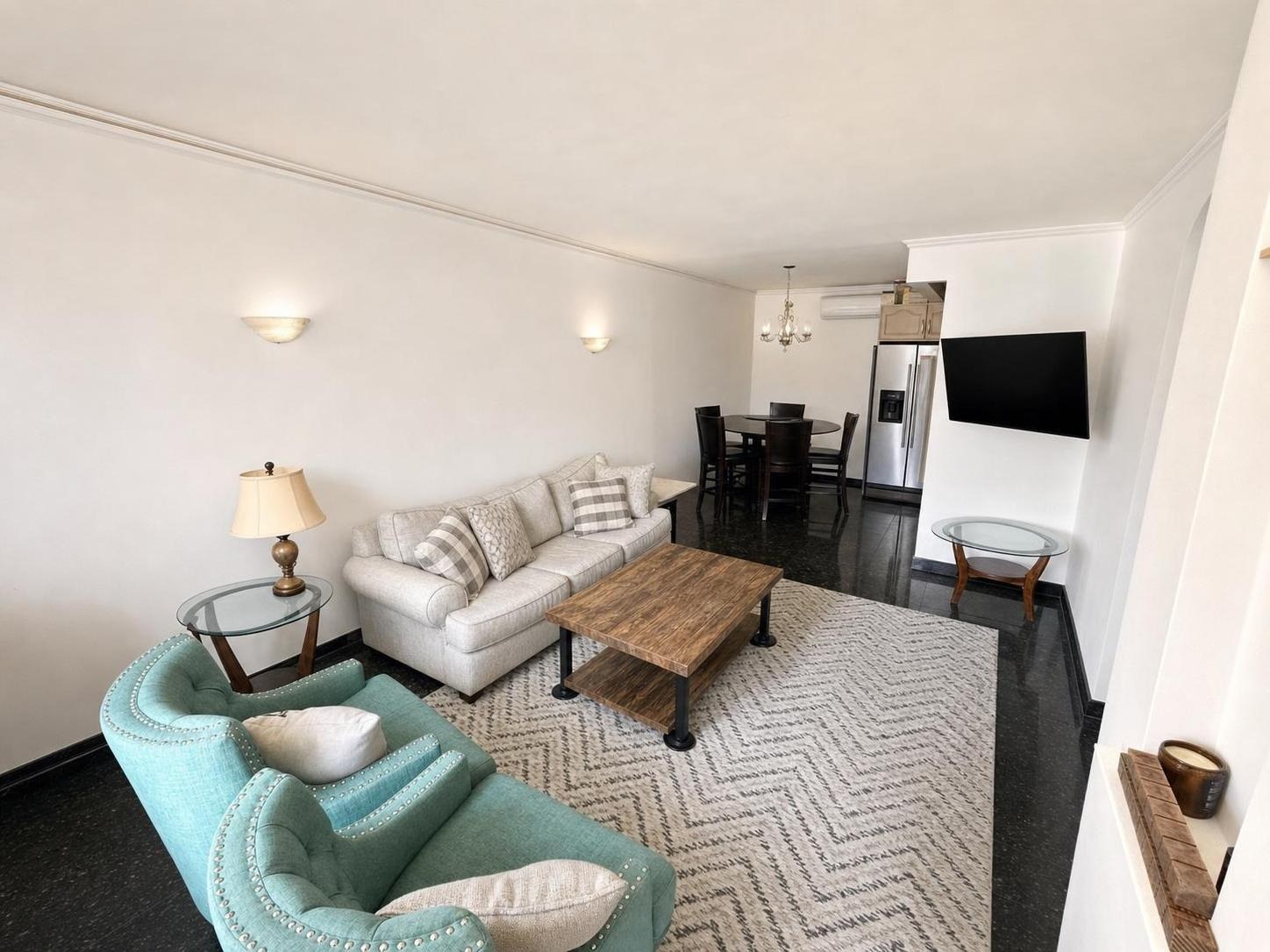
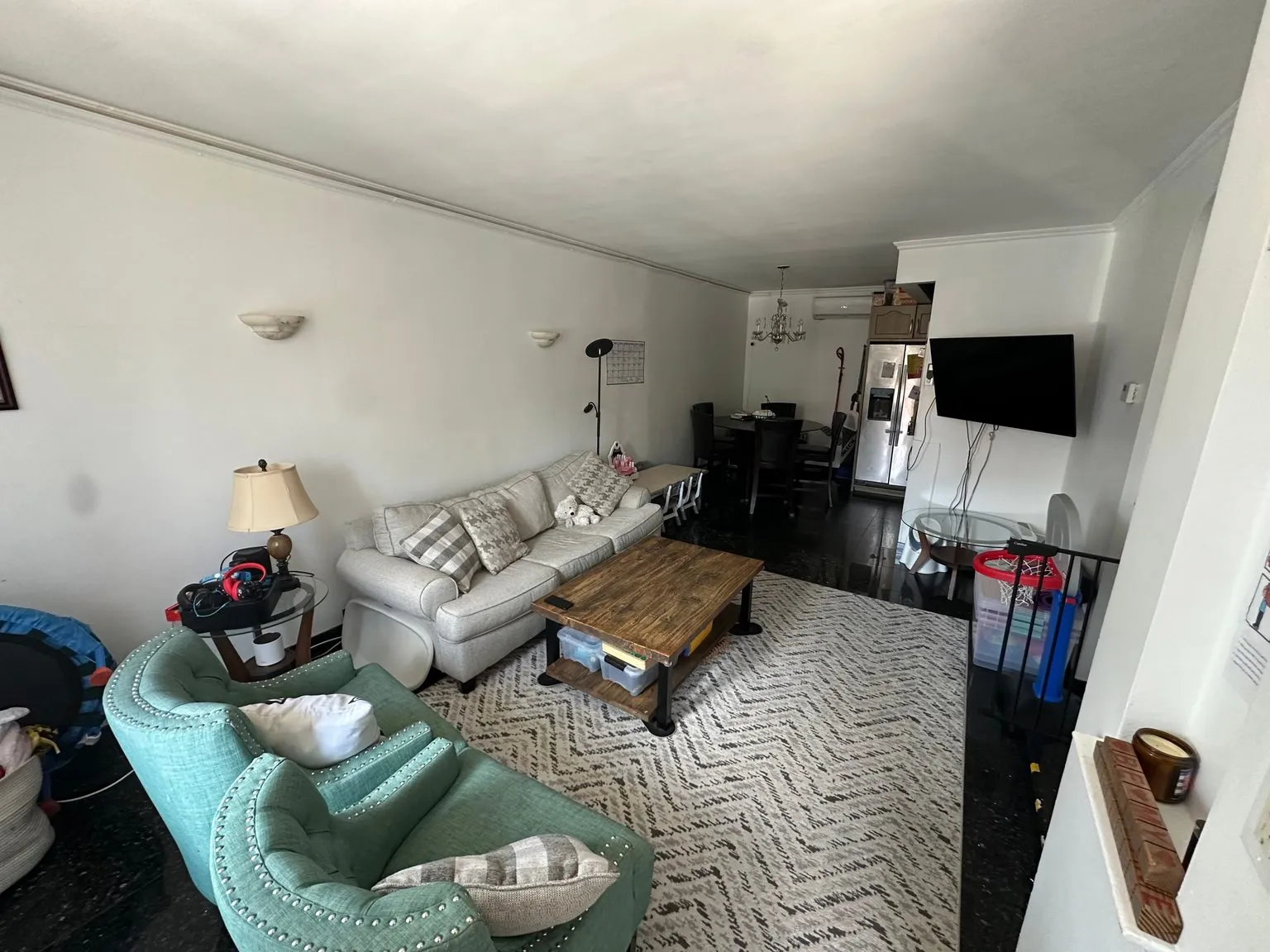 after · decluttered
before
after · decluttered
before
The short version
The seller still lives there, their sectional is enormous and you are on a deadline. Declutter and Enhance do most lived-in-home work; Stage keeps the real furniture and only fills genuinely empty space, so save it for the bare rooms. Personal effects and clutter can go. Fixtures, structure, and anything a buyer would want to know about must never go.
Almost everything written about virtual staging assumes an empty house. Bare walls, bare floors, a tripod, and nobody's dog in the shot. It's a lovely scenario, and it describes a minority of listings.
The rest of the time the seller still lives there. Their sectional is enormous and it isn't going anywhere. There is a cat tree. There are eleven throw pillows, a stack of mail, and a Peloton in the bedroom. And you have a listing to launch.
Occupied homes are the normal case, and they need a different playbook from the empty ones. Most of that playbook is about restraint.
The two tools that belong in a lived-in home
Stylst gives you five tools and asks you to pick one per photo. For an occupied listing, only two of them are usually the right answer.
Declutter removes clutter and personal items — the laundry on the chair, the toys on the rug, the mail on the counter, the cords behind the TV. Your real furniture and the room itself stay exactly as they are. Nothing is invented. It does what you'd have done with twenty minutes and a laundry basket, except you didn't have twenty minutes.
Enhance is a professional photo edit and nothing more: brighter, color-corrected, straightened. Nothing added, nothing removed. It's for the room that's already tidy but still looks like a phone photo.
One credit each, about 30 seconds each. Between them they cover most occupied-home work.
The tool that doesn't
Stage — the tool that adds furniture in a style you choose — is for empty rooms. That's not a limitation, it's the job description. And it's why running it on an occupied room is a bad idea even when it technically works.
Think about what you're proposing: delete the seller's real sofa, put a different, imaginary sofa in its place, and the listing now shows a room that exists nowhere. The buyer books a showing on the strength of it, drives across town, and finds a different room — in about four seconds, because the first thing anyone does in a house they've seen online is compare it to the pictures. At best you've wasted their trip. At worst you've handed them a fair complaint about how the property was marketed, and the honest photo — their actual room, cleaned up and well lit — was going to perform fine anyway.
The exception that proves the rule: if a room is genuinely empty — the seller cleared out the spare bedroom, the basement is bare — stage it, and disclose it as staged exactly as you would in a vacant house. Virtual staging vs. traditional staging covers when full staging is worth it at all.
Fine to remove
This is the stuff that isn't the house. It's the stuff sitting on top of the house, and no reasonable buyer expects it to convey:
- Laundry, dishes, and the drying rack. Nobody is buying the dishes.
- Toys, playpens, and the pile of kid gear by the door.
- Mail, paperwork, keys, chargers, and the cords behind the television.
- The trash can, the recycling bin, the litter box, the pet bowls.
- Toiletries, medication, and everything on the bathroom counter.
- Family photos on the mantel, the kids' artwork on the fridge, anything monogrammed. Partly privacy: the seller's children don't need to appear in a listing syndicated to a dozen portals. Take the frames down before you shoot if you can; if you can't, removing them from the photo is the right call.
Everything on that list has one thing in common: remove it, and the house is unchanged. The buyer who walks in gets exactly the room they saw, minus somebody's socks.
Never remove
And here is the other list, which matters far more:
- Fixtures and built-ins. The radiator, the ceiling fan, the wall-mounted AC unit, the awkward built-in bookcase, the column in the middle of the basement. If it's still there after the moving truck leaves, it stays in the photo.
- Defects. Water stains, cracks, mold, peeling paint, a sagging ceiling, a scorched outlet, a stained carpet. This is the bright line, and it isn't close.
- The load-bearing eyesore. The ugly thing that a buyer would have to spend real money to change is precisely the thing they're entitled to see.
- The neighbor's house. The view out the window and the property line are facts about the listing. So is the power line, the road, and the enormous garage next door.
A photo that quietly erases a problem is the kind of photo that causes trouble at the inspection — and the exposure is the seller's and the agent's, not the software's. The model doesn't sign the disclosure form.
The honest limit.
Declutter removes clutter. It does not remove architecture, and it will not remove a defect. If you find yourself wishing you could edit out the thing a buyer would have to pay to fix, that is the signal to stop editing and start disclosing — not to look for a tool that will do it.
It also can't remove the seller's real potted plant just because you don't like it. That plant is in the room. You can write a photo rule telling the AI never to add a plant, and it will obey — but no rule deletes something that's really there. That limit is deliberate: the moment a tool can delete real objects on request, it stops being a photo of the house.
Working around a family that still lives there
The photo is the easy part. The awkward part is that this is somebody's home and they're standing in it.
Get the seller's buy-in before you edit. They are going to see the listing — it's their listing. A homeowner who scrolls Zillow and finds their dining table replaced by a stranger's has a legitimate grievance, and you'll hear about it. Show them the before and the after and say what came out. Most sellers are relieved. Some ask you to put the ceiling fan back, which is exactly the note you want early.
Do the physical twenty minutes anyway. Declutter works far better on a room that's already 80% clear. Clear the counters, make the bed, hide the cords, close the toilet lid. Feed it real chaos and you're asking it to make decisions you should have made yourself. Our declutter-before-photos checklist is the room-by-room version.
Shoot the whole house at the same time of day. Half the rooms at noon and half at dusk looks wrong even when nobody can say why. It's on the list of photography mistakes that kill listings for a reason.
Take the personal photos down rather than editing faces out. Editing a face out of a picture frame is fiddly and rarely looks clean. Laying the frames flat before you shoot is free.
Pick the right room type. Tell the tool a bathroom is a home exterior and the model will try to give you a house. That failure is common enough that we wrote it up: your bathroom came back as a house.
Disclosure still applies
Two different obligations, and people mix them up. A virtually staged photo — furniture that is not in the house — has to be labeled as virtual staging under MLS and marketplace rules. That's not optional and it isn't a judgment call; is virtual staging legal? walks through what the rules actually say.
An enhanced or decluttered photo generally doesn't require the staging label, because nothing was added and the room is real. But it still has to be honest, and the test isn't legalistic: would a buyer standing in this room feel misled by this photo? Cleaner than reality is fine. Different from reality is not.
What it costs to shoot an occupied listing
Stylst is pay-as-you-go, no subscription required: 10 for $16.99, 30 for $44.99, and 100 for $129.99 — roughly a dollar a photo. One credit is one photo, and each takes about 30 seconds, so a 24-photo occupied listing run through Declutter and Enhance is about $24.
On the web your first photo is free, no card — it comes back with a preview watermark until your first purchase, which unlocks that same photo permanently. In the iPhone and Android apps the first photo is free with no watermark at all. Either way: upload the ugliest lived-in room in the house and see whether you'd actually put the result on the MLS. That's the only test that matters. And if a photo comes back wrong, tell us within 24 hours and we'll re-run it free with your feedback — and if it still misses, we'll credit you back.
Questions people actually ask
Can you remove furniture from a listing photo?
You can, but in an occupied home you usually shouldn't. Deleting the seller's real sectional and dropping in an imaginary one produces a photo the house can't live up to at the showing, and the buyer who drove across town to see it will notice within four seconds. Remove the clutter around the furniture instead, and let the room be the room.
What's the difference between virtual staging and decluttering a photo?
Virtual staging adds furniture that isn't in the room; decluttering removes mess that is. Staging is for empty rooms and has to be disclosed as staged under MLS and marketplace rules. Decluttering takes out the laundry basket, the toys, and the mail while leaving the seller's actual furniture and the actual room untouched.
Can AI remove a water stain, a crack, or a radiator from the photo?
No, and no tool should let you. A water stain, a crack, and a radiator are all facts about the house rather than clutter sitting on top of it, and a photo that quietly erases a defect is the kind of photo that causes trouble at the inspection. If you're wishing you could edit out the thing a buyer would have to pay to fix, stop editing and disclose it.
Do I need the seller's permission to edit photos of their home?
Get it before you edit, always. The seller is going to see the finished listing, and a homeowner who discovers their dining table was swapped for someone else's without being asked has a fair complaint. Show them the before and after, explain what came out and why, and it stops being a surprise.
The bottom line
In an occupied home the good tools are the boring ones: Declutter and Enhance. Take out the socks, the mail, and the family photos. Leave the furniture, the fixtures, and every single thing a buyer would have to live with or pay to fix. The photo you want is the seller's house on its best day — not a house it will never be.