Can You Change an AI-Staged Photo After It's Generated? (Yes — Here's How)
The staging came back 90% right: the sofa works, the light is good, the rug is wrong. With most tools your only move is to start over. Here's what changing a photo should actually look like.
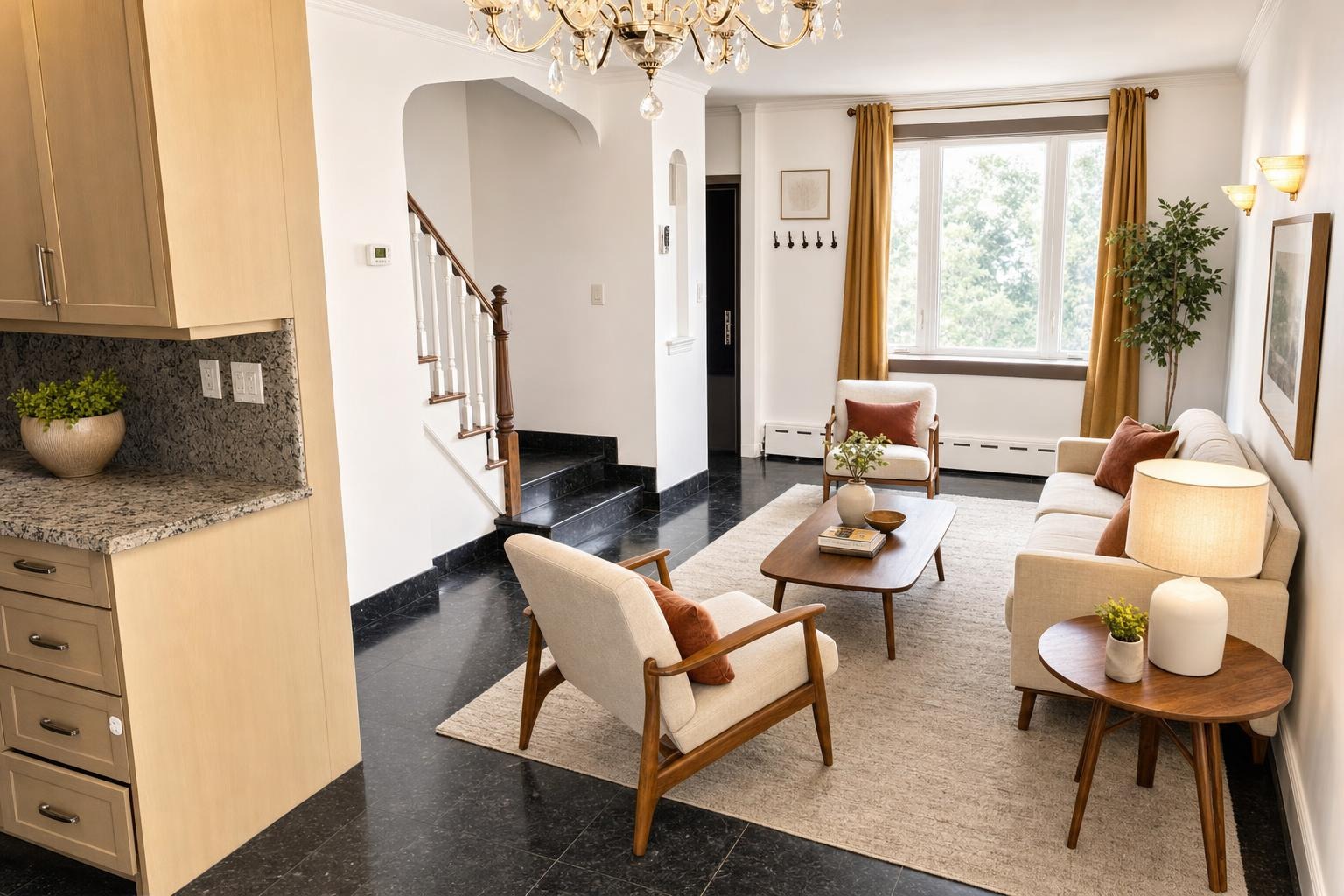
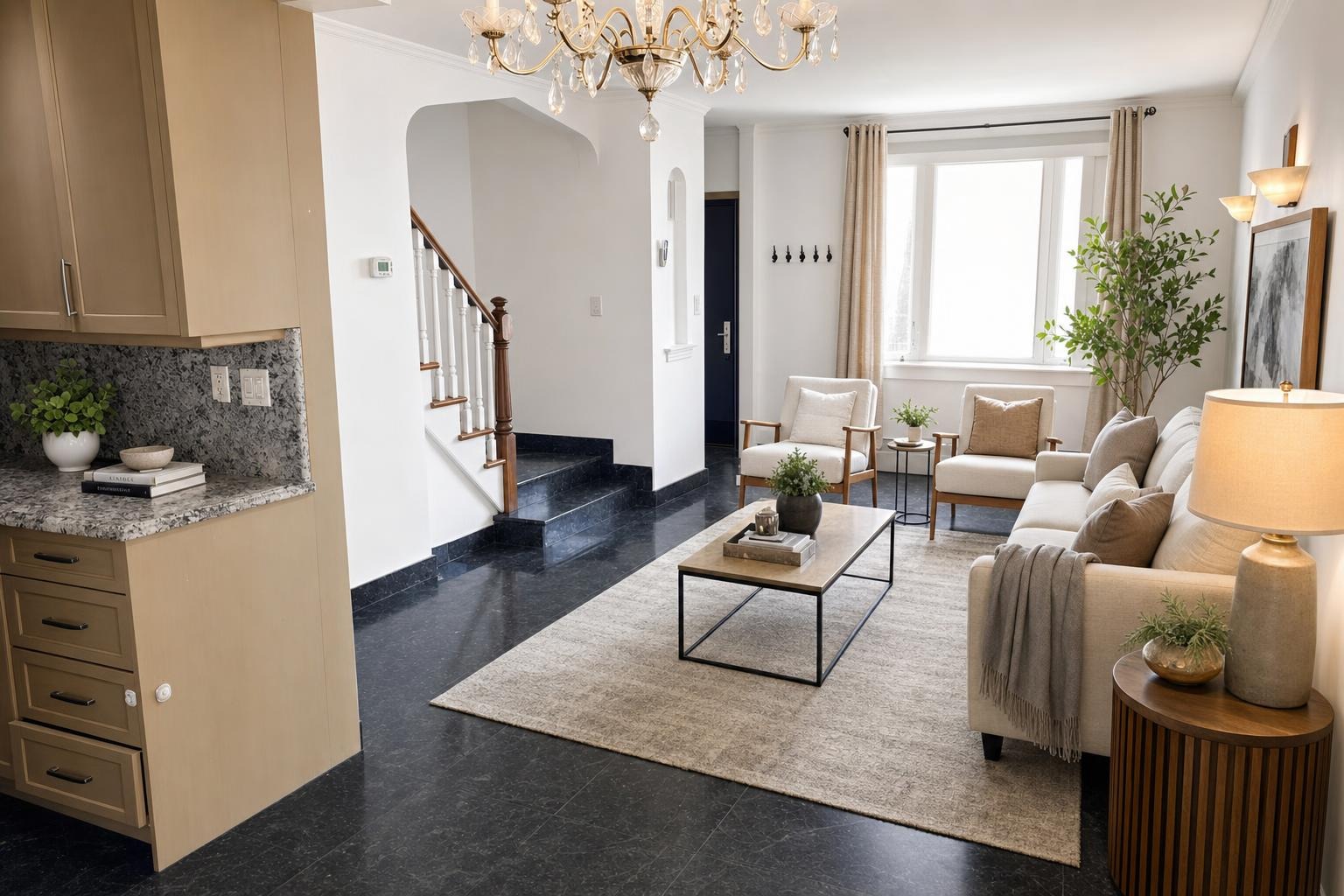 v3 · midcentury
v2 · modern
v3 · midcentury
v2 · modern
The short version
Most AI staging treats generation as final, so a photo that came back ninety percent right leaves you starting over. A change should be a conversation with the photo you already have: say what is wrong in words, keep every version, and pay nothing extra to re-roll it.
Every agent who has used AI staging knows this moment. The photo comes back almost right: the sofa sits well, the room finally looks lived-in — and the rug is enormous. Or the dining table is too formal for the neighborhood. Or you look at it and think: this room wants to be Midcentury, not Modern.
The staging isn't wrong. It just isn't what you'd choose. So: can you change it?
With most AI staging tools, the honest answer is no — not really. And the workaround they leave you with is worse than it sounds.
The one-shot problem
Most AI staging treats generation as final. You upload, you pick your settings, you get a render — and that's the transaction. Want anything different? Back to the start: find the original on your camera roll, upload it again, re-pick everything, pay for a brand-new generation.
That new generation is a fresh roll of the dice. It doesn't know what the last one looked like, so it may fix the rug and lose the sofa you liked. And unless you downloaded the earlier version first, it's gone — you can't put the two side by side, because only one of them still exists.
So "can I change it?" quietly becomes "am I willing to gamble what I have for a chance at what I want?" That's not editing. That's re-rolling.
What changing a photo should look like
A change should be a conversation with the photo you already have, not a restart. In Stylst it works like this: open any photo in your account, tap Change this photo, and tell it what you want different — in plain words. "Warmer lighting, a smaller rug." "Less formal — lighter woods." You can also switch the room type, the style, or the tool entirely, in the same step.
The part that makes this work: Stylst re-works the photo from your stored original — the photo you first uploaded, which stays saved in your account. That matters for two reasons.
- Nothing to re-upload. No hunting through your camera roll for the source photo. It's already there. The change is one tap and a sentence.
- The room can't drift. Because every version starts from the same original, the architecture, the windows, and the framing stay put. Ask for a smaller rug and you get the same room with a smaller rug — not a subtly different room. (To make the request itself land better, here's how to phrase instructions the AI actually follows.)
And when the note is about one specific object rather than the whole photo, you don’t have to describe it at all — you can tap the photo and point at it, then say what should happen there. That’s the better tool for "not that plant."
Each change is a fresh generation, so it takes about 30 seconds — and re-rolling a photo you already paid for is included. The credit bought the finished photo, not one attempt at it.
Versions are a feature, not a leftover
Here's the part that changes how you use it: nothing gets overwritten. Your account keeps the original, the first staged version, and every change after it, and you can flip between any of them with the before/after compare.
That turns versions from a byproduct into a working tool. Stage the living room Modern, change it to Midcentury, and you're not choosing blind — you're looking at both, on the same room, from the same angle. Download the winner for the MLS. Keep the runner-up for the seller who preferred it. Nothing forces you to pick early, because picking doesn't destroy anything.
Wrong is free. Re-rolling is included.
Two things worth keeping separate, because they're the difference between an edit and a complaint.
If a result is actually wrong — the geometry breaks, a doorway vanishes, the staging misses what you asked for — that's on us, and the guarantee covers it: if we get it wrong, we'll redo it free. Tell us within 24 hours, we re-run it with your feedback, and if it still misses, we credit the photo back. Here's what that process looks like.
Changing your mind isn't a defect — and it isn't a second purchase either. "Actually, let's see it Coastal" is a re-roll of a photo you already bought, and re-rolls are included. Unlimited revisions cover every newly paid photo using the same original photo and tool, with no expiry. Switching to a different tool starts a new generation, priced before submission.
Wrong is free. Re-rolling is included. Either way, the answer to "can we try it?" is yes.
Where this earns its keep
Three situations where changing the photo you have beats everything else on the menu:
The seller has notes. The staged dining room feels too formal for the house, the seller says. Type "less formal — lighter woods, simpler table setting," and about 30 seconds later you're both looking at v2 next to v1. The seller feels heard, and the version you liked is still there if they change their mind back.
The listing photographs dark. Some rooms just do — north-facing, small windows, heavy trees. If the staging is right but the mood is off, ask for it: "warmer, brighter lighting." Same furniture, same room, better light.
The broker tour is Thursday. You have a strong living room shot and a hunch it would land better Midcentury than Modern. Run the change, walk in with both versions, and let the room full of opinions pick — the style guide covers what each one signals. Trying an idea costs nothing, so ideas get tried.
Questions people actually ask
Can I change an AI-staged photo after it's generated?
With Stylst, yes. Open any photo, tap Change this photo, and describe what you want different — "warmer lighting, a smaller rug" — or switch the room, style, or tool. Stylst re-works it from your stored original photo, re-rolls of a photo you already paid for are included, and every version stays saved in your account so you can compare them and use the one you like best.
Do I have to re-upload the photo to change it?
No. Stylst keeps your original photo, so a change is generated from the same source as the first version — same walls, same windows, same framing. There is nothing to find on your camera roll and nothing to re-upload; you just say what should be different.
What does changing a photo cost?
Re-rolls are included. A credit buys the finished photo, not one attempt at it, so asking for a different style, a smaller rug or warmer light on a photo you already paid for does not cost another credit. Unlimited revisions cover every newly paid photo using the same original photo and tool, with no expiry. Switching tools starts a new generation, priced before submission. And if a result is actually wrong — broken geometry, the wrong kind of room — that's covered by the guarantee instead: tell us within 24 hours and we'll re-run it free with your feedback, and if it still misses, we credit the photo back.
Do I lose the first version when I change a photo?
No. Every version stays in your account alongside the original — v2 doesn't overwrite v1. You can flip between versions with the before/after compare, download whichever one wins, and keep the rest for the next conversation with your seller or broker.
The bottom line
The first version of a staged photo is a draft, not a verdict. A tool that treats it as final turns every note from a seller into a fresh gamble; a tool that can change it turns the same note into a sentence. Try it: stage a photo, then change one thing in words and watch the room hold still while the staging moves. On the web your first photo is free in supported regions — a watermarked preview your first purchase unlocks. The changes are where it gets fun.