Why Good AI Staging Takes About 30 Seconds
A fast render and a checked result are no longer opposites. Stylst now finishes the same full pipeline in about 30 seconds.
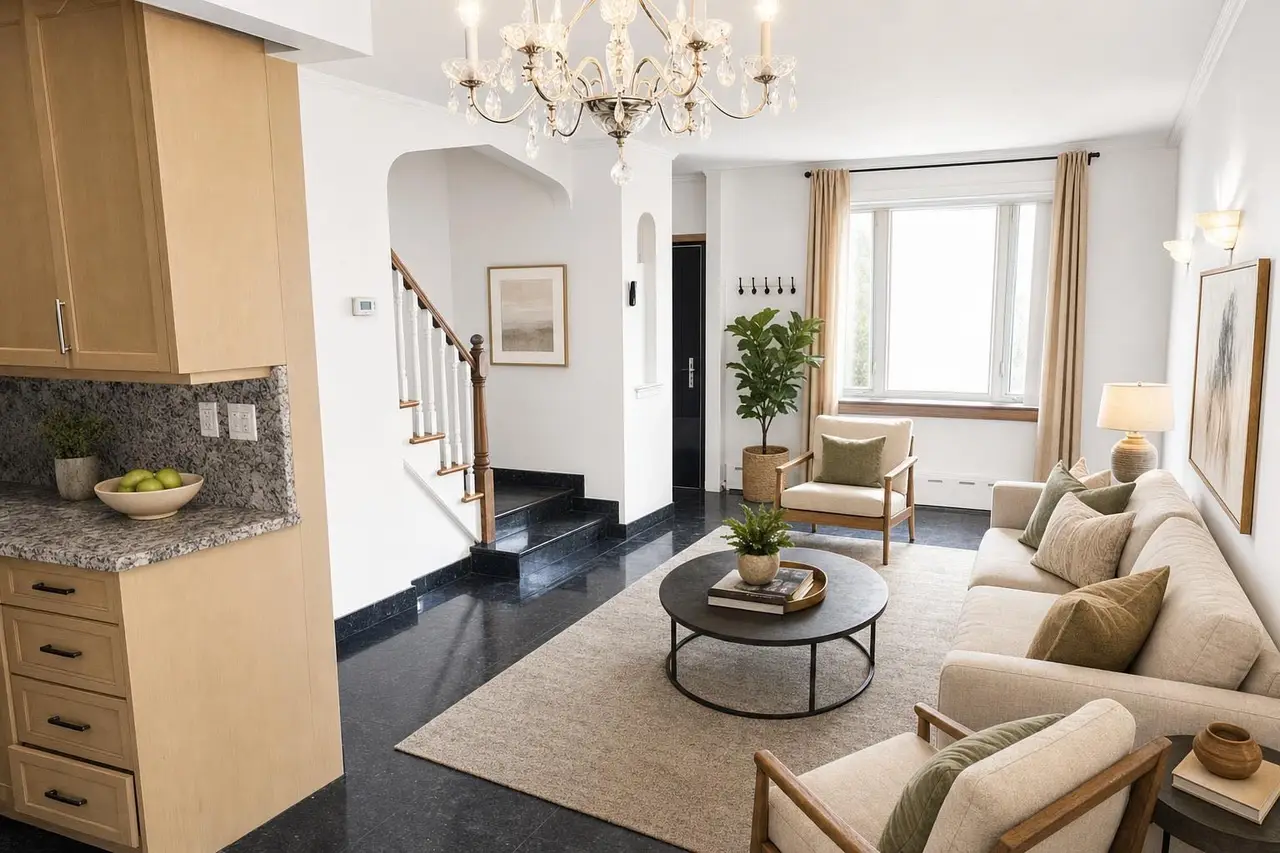
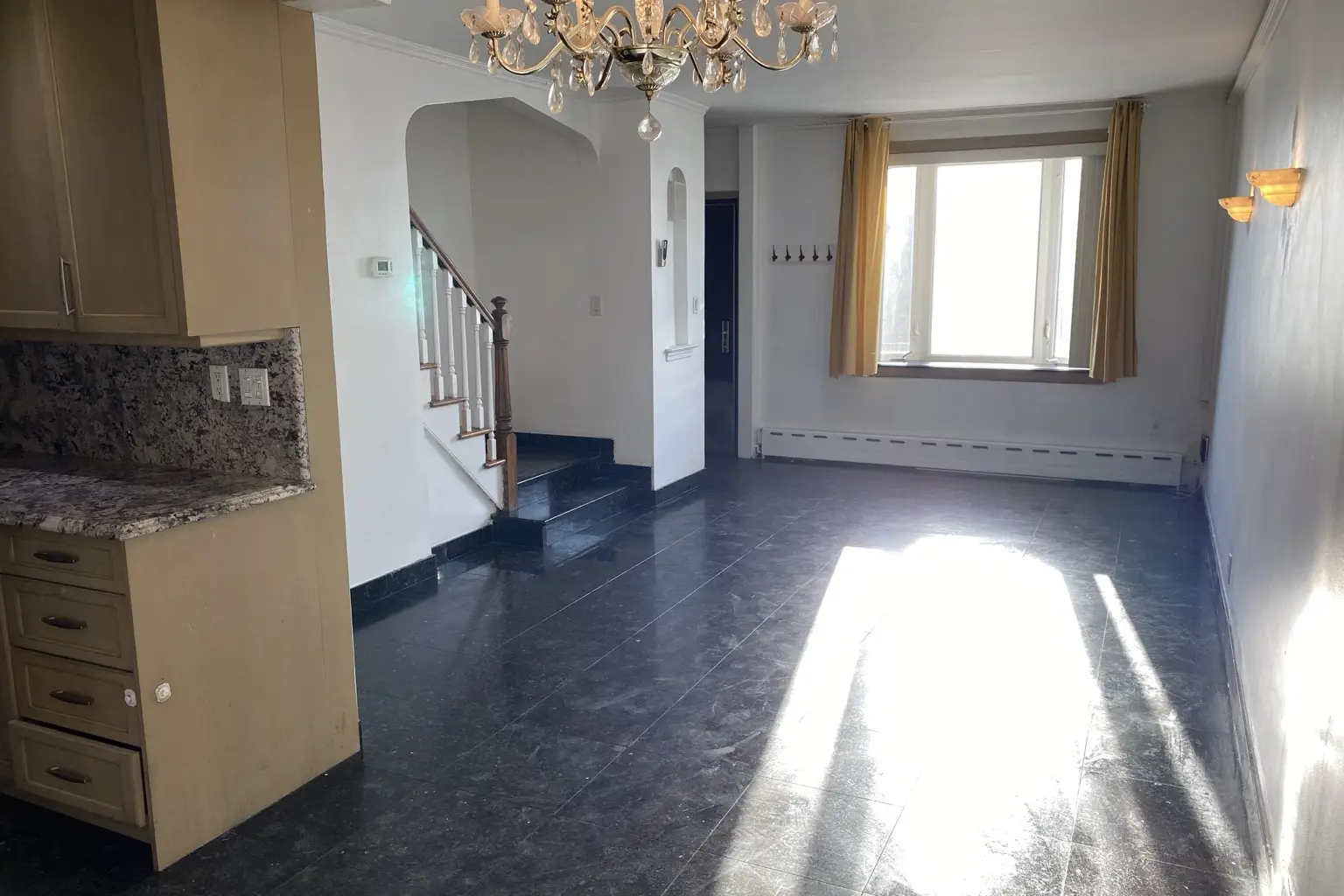 after · staged
before · empty
after · staged
before · empty
The short version
The stopwatch only tells part of the story. Stylst now takes about 30 seconds for the render and the checks around it, while keeping the same architecture, rule, and consistency safeguards.
Measured before rollout: three matched Sunburst edits averaged 31 seconds on September 8, 2026. That small launch sample supports “about 30 seconds”; production events will continue recording the actual duration and billed token cost of every generation.
Stylst takes about 30 seconds to stage a photo. People ask about that number, and the honest way to answer it is not "our servers are busy." It's this: the render is one pass out of several, and most of the other passes are checks.
The more useful question is not whether a tool is fast. It is what happens before and after the render, and whether those steps are real.
Speed is not the whole product
Image models have dials for quality, resolution, and how much work they do on a specific photo. Model improvements can make the same workflow materially faster without removing the checks around it. That is what changed here: the production model changed, while the surrounding Stylst pipeline stayed in place.
The result still has to work across a whole listing: furniture should remain believable, window light should behave, and the perspective should hold from room to room. A fast first result is useful only if those basics survive.
Looking at the result still takes a separate pass. Stylst keeps that work in the pipeline, so the first quality check is not left entirely to you at 9pm with the listing going live in the morning.
What the 30 seconds are actually spent on
Being specific, because vague claims about "our proprietary process" are exactly the kind of thing this post is arguing against. Here is the real sequence for a single staged photo.
- Room detection, the moment you pick the photo. A vision model reads the image and identifies the room, so the tool starts from what you actually photographed rather than from whatever the dropdown said last time. You can override it — your word always wins — but you're correcting a reading, not filling in a blank.
- A scene pre-check, before your credit is spent. The photo gets classified interior or exterior, and checked for being a collage of several rooms stitched into one image. This catches the specific disaster of a bathroom sent through the day-to-dusk tool, which produces a hallucinated house where your shower used to be. Find a contradiction and you get a one-tap correction instead of a charge. It fails open: if the check itself errors, your photo goes through anyway. Seatbelt, not gate.
- A furniture carry. If you've staged other photos of this property recently, this pass works out whether it's the same home, so the sofa in photo four can belong to the same imaginary furniture set as the sofa in photo one.
- The render. The image model at the production high-quality setting. This is the bulk of the roughly 30 seconds.
- A rule-compliance check, on the finished photo. If you've saved a photo rule with a prohibition in it — the classic is "never add fake plants, candles instead" — a second vision model looks at the image that just came back and asks whether the plant is in it anyway. Verification, not trust, for the reason in the next section.
- A corrective re-run, if the rule was broken. The photo runs again, once, with the mistake named concretely: "the previous attempt added a potted plant on the dresser." That second render is at our expense, never a second credit.
- A consistency verify. If we promised the furniture would match the rest of the property, this confirms the promised pieces actually showed up.
- A grounded architectural-truth release check. Last, the finished candidate is compared with your original photograph. It checks that counters, ledges, built-ins, doors, appliances and walking paths still describe the real property, and that added furniture is physically usable where it was placed. A failed candidate gets one corrective render from the original; if the correction still fails—or the check is unavailable—the candidate is withheld and the credit is refunded.
Two pieces of plumbing ride along with it: the output comes back in the aspect ratio you sent — 9:16 in, 9:16 out — so the before and after line up and the download matches the shot you took, and a portrait phone photo gets its orientation baked in rather than staged sideways.
Image models are bad at the word "no"
This is the fact that justifies half the pipeline, so it's worth stating plainly: image models render the things you name. Tell one "no plants" and you have just said the word "plants" to a system that draws what it hears.
You can watch it happen. Give an image model a clear prohibition and it will cheerfully honor the positive half of your instruction — the candles show up — while the forbidden thing lands anyway, run after run. Negation is a weak signal to a system built to add.
There are two responses. Accept it and hope, which is what one-shot generation does by default. Or look at the output and check — and when the check fires, don't repeat "no plants" louder. Name the specific violation in the specific image. That's a concrete, positively-framed correction, and models follow those far better than a repeated prohibition. Don't argue with the model, describe the mistake. The normal render and checks now fit into about 30 seconds; a corrective re-render can take longer.
The checks are billed to us, not to you
Worth being blunt about the economics, because it explains why most tools skip this.
Every verification pass is a model call, and model calls cost money. The corrective re-render is a second full-price render on a photo you paid for once. The pre-check runs before the credit is spent, which means that when it catches something, we've spent money on a photo we then decline to charge you for. None of that lands on your invoice. All of it lands on ours.
That's the trade. The extra passes buy fewer photos that come back unusable, and unusable photos are what actually costs an agent money — in re-runs, in a listing that ships with a bad hero shot, in the twenty minutes spent deciding whether the plant is bad enough to redo. And if you have no rules saved, the compliance check has nothing to verify and never runs, so you never wait for it.
We don't have a secret model
Since this is a post about honesty, here's the part that isn't flattering.
Stylst does not have a custom model. No in-house engine, no fine-tune, no proprietary architecture. We run a leading third-party image model at a high-quality production setting — the same class of engine any competitor can rent today with a credit card.
Which means the model cannot be the differentiator, and anyone selling you theirs is usually renting the same thing you could. What's actually different is everything wrapped around the render: what gets looked at before your credit is spent, what gets looked at after the photo comes back, and whether a mistake is caught by software or by you. That's a less exciting story than a secret model. It's also the only version that survives you checking it.
The pipeline is the product.
Anyone can call an image model — it's a few lines of code and an API key. What separates a usable listing photo from a slot machine pull is the boring part: identifying the room, refusing an obviously contradictory job, verifying the output against what the customer asked for, and paying for the redo yourself when it missed. None of that is glamorous, and all of it takes time you can measure on a clock.
Where the checks earn their keep
Three failure modes that used to be the customer's problem:
The bathroom that became a house. Day-to-dusk is an exterior tool. Point it at an interior photo and the model, asked for a dusk exterior, will invent one — a whole house that has nothing to do with your listing. The pre-check catches the contradiction before the charge and offers the switch.
The collage. Plenty of people upload one image that's four rooms in a grid, because that's how it came out of an old export. A staging model handed a collage does something strange with all four. That gets flagged at pick time now, with the honest advice: send them separately.
The listing where the sofa changes. Two angles of one living room used to be two entirely independent renders, which meant two different sets of furniture and a buyer noticing the barstools vanished between photo two and photo three. The furniture carry and the consistency verify exist for exactly that — there's a whole post on carrying one furniture set through a listing.
About 30 seconds is the fast lane
About 30 seconds is a rounding error against the way this used to work — human shops quote 24 to 48 hours a round. The point is simple: the faster model lets the render and the checking stay in one short working session.
And when it still comes back wrong
It will sometimes. No amount of verification makes a generative system deterministic, and we'd rather say so than pretend otherwise. If a photo is wrong — broken geometry, the wrong kind of room, a rule ignored — tell us within 24 hours and we'll re-run it free with your feedback, and if it still misses, we'll credit you back. If it's merely not what you'd choose, that's a different thing: you can change a generated photo in words without starting over.
Questions people actually ask
Why does AI virtual staging take about 30 seconds?
Because the render is only one of the passes. Before it runs, Stylst identifies the room and checks whether the scene matches the tool you picked. After it comes back, Stylst checks the result against saved rules, property consistency, and the original photograph. The 30 seconds cover the render plus the normal checks.
Does faster AI staging mean a worse result?
Not automatically. Model improvements can reduce render time without lowering the selected quality. The useful questions are whether the result preserves the property, whether it is checked, and what happens when a check finds a problem.
What is the AI actually doing during those 30 seconds?
Room detection, a scene pre-check, the render, and then verification. The pre-check classifies the photo as interior or exterior and flags a collage, so a bathroom shot never gets run through the day-to-dusk tool and invents a house that was never there. The verification passes look at the finished image and ask whether it obeyed the rules you saved and whether the furniture matches the rest of the property.
Does Stylst use its own AI model?
No. Stylst runs a leading third-party image model at a high-quality production setting. The difference is the pipeline around it: what gets checked before your credit is spent and after the photo comes back.
Do I pay for the extra passes?
No. The checks cost us money and cost you nothing. If the pre-check catches a contradiction before the render starts, no credit is spent at all. If the compliance check finds that the finished photo broke a rule you saved, the corrective attempt is a second full render billed to us, never a second credit.
Why did my AI staged photo come back wrong?
Usually one of three things: the room type was wrong for the photo, the source shot was dark or crooked, or the upload was several rooms stitched into one collage. Stylst tries to catch the first and the third before charging you, and the ones it catches arrive as a one-tap correction instead of a bad photo. If one still gets through, tell us within 24 hours and we'll re-run it free with your feedback, and if it still misses, we'll credit you back.
The bottom line
Speed is easy to sell because it's easy to measure. Stand a stopwatch next to two tools and one of them wins, and nothing on the screen tells you the fast one skipped the part where somebody checks.
About 30 seconds now covers identifying the room, refusing the obviously wrong job before you're charged, rendering at the production setting, and verifying the result against what you asked for. On the web your first photo is free in supported regions — a watermarked preview your first purchase unlocks — so you can time it yourself.